Timify routine for PHP

Takes a number of seconds i.e. “120000002” and converts into “3y 42w 2d 21h 20m 2s”.

function timify(int $seconds):string
{
    $units['s'] = 1;
    $units['m'] = 60;
    $units['h'] = 60 * $units['m'];
    $units['d'] = 24 * $units['h'];
    $units['w'] = 7 * $units['d'];
    $units['y'] = 52 * $units['w'];

    $result = [];

    foreach (array_reverse($units) as $unit=>$value)
        if (($s = floor($seconds / $units[$unit])) != 0)
        {
            $result[] = $s.$unit;
            $seconds = $seconds - $s * $value;
        }

    return implode(" ",$result);
}

Udgivet i PHP | Skriv en kommentar

Windows 11 Hacks

Remove that annoying fake right-click-popup menu and get the real one back:

reg.exe add "HKCU\Software\Classes\CLSID\{86ca1aa0-34aa-4e8b-a509-50c905bae2a2}\InprocServer32" /f /ve
Udgivet i Windows | Skriv en kommentar

OpenVPN Server / ca certificate expiration check for Nagios

#!/usr/bin/python3

import argparse, os, sys, subprocess, time, math, datetime

def timeify(seconds):
    from collections import OrderedDict
    from math import floor

    units = dict()
    units["s"] = 1
    units["m"] = 60
    units["h"] = 60 * units["m"]
    units["d"] = 24 * units["h"]
    units["w"] = 7 * units["d"]
    units["y"] = 52 * units["w"]

    result = []
    for unit in reversed(units):
        if (s:=floor(seconds / units[unit])) != 0:
                result.append(str(s)+unit)
                seconds = seconds - s * units[unit];

    return (" ".join(result))

ap = argparse.ArgumentParser( formatter_class=argparse.ArgumentDefaultsHelpFormatter)
ap.add_argument('certificate', help='Run cron-helper')
ap.add_argument('-c','--critical', help='Critical threshold', action='store', default=10)
ap.add_argument('-w','--warning', help='Warning threshold', action='store', default=30)
ap.add_argument('-d','--description', help='Add description to output', action='store')

args = ap.parse_args();

if not os.path.isfile(args.certificate):
    print ("ERROR: File `"+args.certificate+"` not found!");
    sys.exit(-1);

if not os.access(args.certificate, os.R_OK):
    print ("ERROR: File `"+args.certificate+"` not readable!");
    sys.exit(-1);

result = subprocess.run("openssl x509 -enddate -noout -in "+args.certificate+" | cut -c10- | date +%s -f -", shell=True, capture_output=True);

if result.returncode != 0:
    print ("ERROR: Could not run / failed to parse openssl output");
    sys.exit(-1);

try:
    expires = int(result.stdout)
except:
    print ("ERROR: Failed to parse openssl output");
    sys.exit(-1);

now = int(time.time())

if args.description:
    desc = " ("+args.description+")"
else:
    desc = "";

if expires < now:    # Expired
    print ("CRITICAL: Certificate "+args.certificate+desc+" expired "+timeify(now - expires)+" ago");
    sys.exit(2);

days_left = math.floor((expires-now) / 60 / 60 / 24)
valid_until = datetime.datetime.fromtimestamp(expires).strftime("%c");

if days_left <= int(args.critical):
    print ("CRITICAL: Certificate "+args.certificate+desc+" expires "+valid_until+" ("+str(days_left)+" days left)");
    sys.exit(2);

if days_left <= int(args.warning):
    print ("WARNING: Certificate "+args.certificate+desc+" expires "+valid_until+" ("+str(days_left)+" days left)");
    sys.exit(1);

print ("OK: Certificate "+args.certificate+desc+" valid until "+valid_until+" ("+str(days_left)+" days left)");
sys.exit(0);
Udgivet i Python | Skriv en kommentar

Timify routine for Python3

Takes a number of seconds i.e. “120000002” and converts into “3y 42w 2d 21h 20m 2s”.

#!/usr/bin/python3

def timeify(seconds):
    from collections import OrderedDict
    from math import floor

    units = dict()
    units["s"] = 1
    units["m"] = 60
    units["h"] = 60 * units["m"]
    units["d"] = 24 * units["h"]
    units["w"] = 7 * units["d"]
    units["y"] = 52 * units["w"]

    result = []
    for unit in reversed(units):
        if (s:=floor(seconds / units[unit])) != 0:
                result.append(str(s)+unit)
                seconds = seconds - s * units[unit];

    return (" ".join(result))

print (timeify(120000002));
Udgivet i Python | Skriv en kommentar

Adding drop-shadow to columns in WordPress / Gutenberg using Twenty Twenty Four

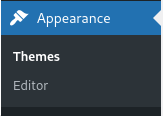
In backend left-side menu click “Appearance” and then “Editor”:

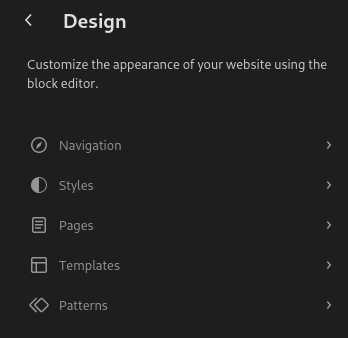
You are not in the customizer, click “Styles”:

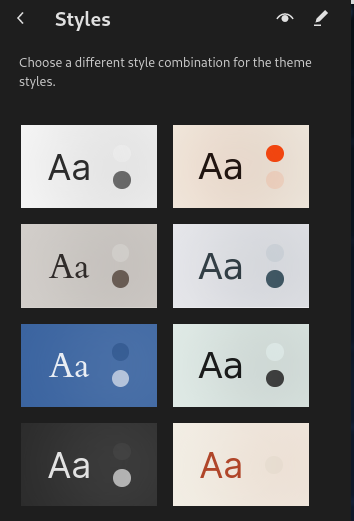
This takes you to the style-selector, click the edit-button in the op right. Looks like a pen:

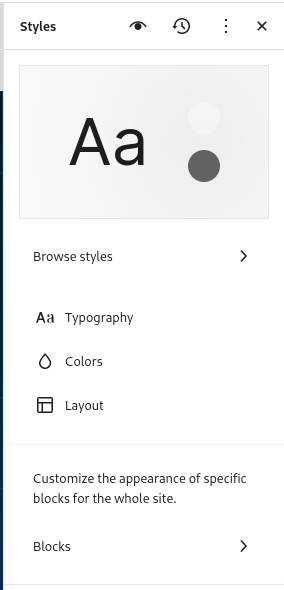
This opens the style-editor in the right site of the screen:

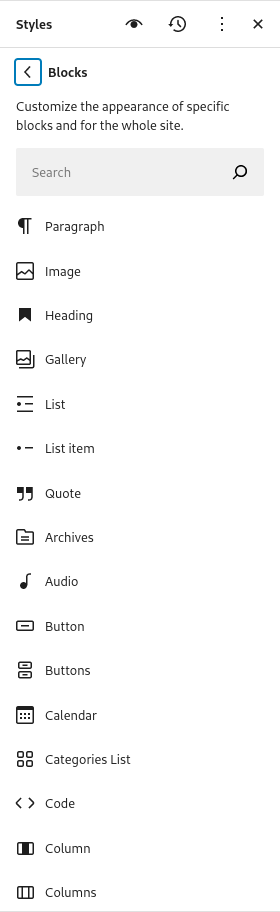
Now click “Blocks”, this brings up a list of blocks you can customize, pick “Column”:

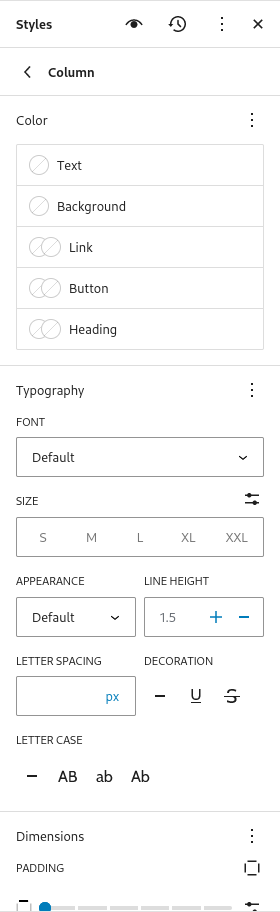
This brings you to an interface that lets you change the default design for columns:

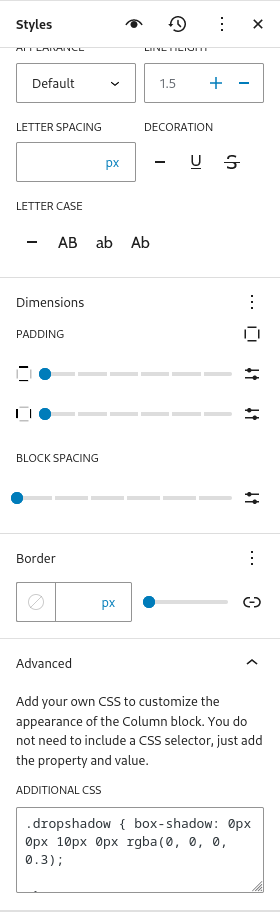
You need to scroll to the bottom, open the “Additional CSS” option:

And add the code you see there:

.dropshadow { 
    box-shadow: 0px 0px 10px 0px rgba(0, 0, 0, 0.3);
 }

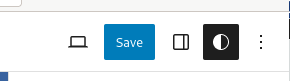
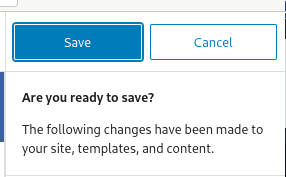
Then click the “Save” button in the top-right corner:

Button changes a bit, just in case you changed your mind. Click it again:

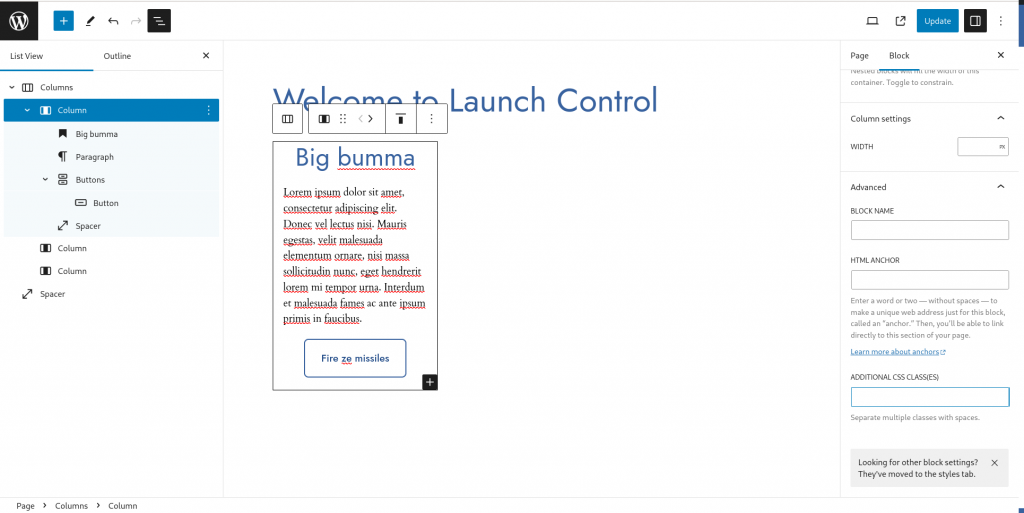
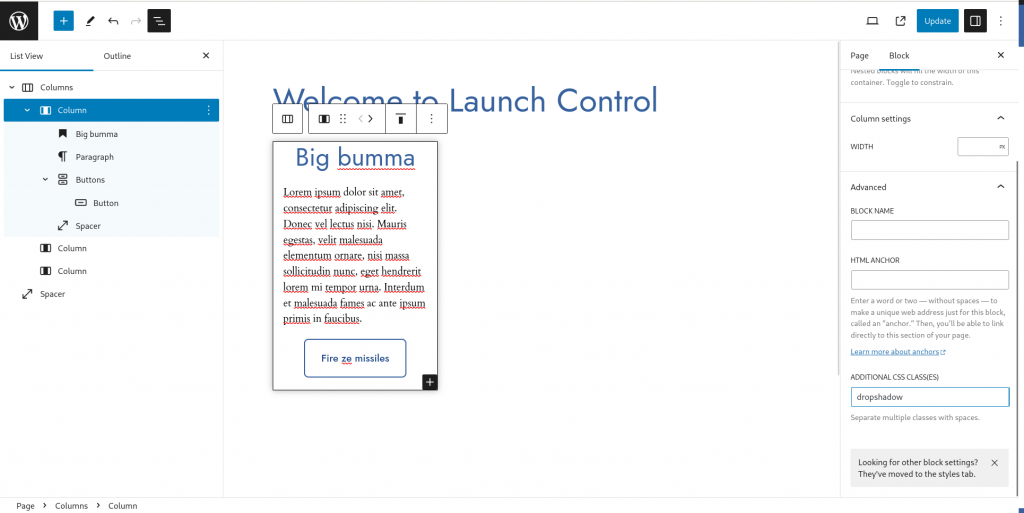
Now navigate to the page and the column in the editor where you wish to add drop shadow:

And add “dropshadow” as a css-class:

Very pwetty and very phancey ?

Udgivet i Wordpress | Skriv en kommentar

Simple Javascript clock

As the title says:

<html>
  <head>
    <title>Clock</title>
    <script 
      src="https://ajax.googleapis.com/ajax/libs/jquery/2.2.4/jquery.min.js">
    </script>
    <style>
      /* Needed for positioning div */
      body {
        font-size: 58pt;
        height: 100vh;
        height: 100%;
        display: flex;
        justify-content: center;
      }
      #clock {
        margin: auto;
        text-align: center;
        margin: auto;
      }
      /* Just styling */
      body {
        background-color: black;
        color: yellow;
        font-family: 'Arial';
      }
    </style>
  </head>
  <body>
    <div id=clock>
      <div id=date></div>
      <div id=time> </div>
    </div>
    <script>
      function nf(i)
      {
        if (i < 10)
          return "0"+i;
        else return i;
      }
      function updateClock()
      {
        const d = new Date();
        d.getTime();
        $("#time").html( d.getHours()+":"+
                         nf(d.getMinutes())+":"+
                         nf(d.getSeconds()));

        let days = ["S&oslash;ndag", "Mandag", "Tirsdag", "Onsdag","Torsdag",   
                    "Fredag","L&oslash;rdag"];

        let months = ["Januar","Februar","Marts","April","Maj","Juni","Juli",
                      "August","September","Oktober","November","December"];

        $("#date").html( days[d.getDay()]+" d. "+
                         d.getDate()+" "+
                         months[d.getMonth()]+" "+
                        (1900+d.getYear()));
        setTimeout(updateClock, 500);
      }
      updateClock();
    </script>
  </body>
</html>
Udgivet i Javascript | Skriv en kommentar

Faking time on Debian 12

Sometimes you need to test stuff that only happens once a day, that can be tiresome to wait around for, so playing a bit of Deloran-style-prank on you Linux systems can be handy.

Start by disabling ntp:

root@lab1:~# timedatectl
               Local time: Sat 2023-12-02 05:54:58 CET
           Universal time: Sat 2023-12-02 04:54:58 UTC
                 RTC time: Sat 2023-12-02 04:54:59
                Time zone: Europe/Copenhagen (CET, +0100)
System clock synchronized: yes
              NTP service: active
          RTC in local TZ: no
root@lab1:~# timedatectl set-ntp false
root@lab1:~# timedatectl
               Local time: Sat 2023-12-02 05:55:09 CET
           Universal time: Sat 2023-12-02 04:55:09 UTC
                 RTC time: Sat 2023-12-02 04:55:10
                Time zone: Europe/Copenhagen (CET, +0100)
System clock synchronized: yes
              NTP service: inactive
          RTC in local TZ: no
root@lab1:~#

And then you can simply set whatever time you want:

root@test1:~/test# timedatectl set-time '2123-12-05 12:00:00'
root@test1:~/test# date
Sun Dec  5 12:00:01 PM CET 2123
Udgivet i Linux | Skriv en kommentar

Styling Nagios output for a large display

Theres not really any built in features for styling Nagios, so i devised a simple workaround that utilizes html, css and jquery to do the trick.

We need to run this on the same domain as Nagios itself or disable cors for this to work.

<html>        
 <head>
  <title>Nagios Services Monitor</title>
  <script 
    src="https://ajax.googleapis.com/ajax/libs/jquery/2.2.4/jquery.min.js">
  </script>
  <style>
   body {
    padding: 0;
    margin: 0;
   }
   #nagios {
    height: 100%;
    width: 100%;
    overflow: hidden;
    zoom: 175%;
   }  
  </style>
 </head>
 <body>
  <div id=nagios></div>
  <script>
   $(document).ready(function(){                               
   setInterval(function()                                
   {
    $.get('/cgi-bin/nagios4/status.cgi?host=all&servicestatustypes=28',
     function(data) {    
      data = data.replace("Updated every 90 seconds",
                          "Updated every second");
      data = data.replaceAll(/<script[\s\S]+<\/script>/g,
                            "<!-- scripts removed -->");
      $('#nagios').html(data);
                       });
      },1000);
   });
   </script>
 </body>
</html>

Tested in Chromium.

Udgivet i Nagios | Skriv en kommentar

Delete USB partitions on Windows

Really useful if you have a USB Stick which have been used for installing Debian or another Linux and you wish to use it for something on Windows, the graphical partition manager in Windows are way to retarded to do this, but luckily there’s a CLI tool who can do it:

C:\Users\mike> diskpart

Now windows will show a popup asking for permissions to run this tool with administrator privileges, after you granted this you will be in a “DISKPART” prompt, now do this:

Microsoft DiskPart version 10.0.19041.3636

Copyright (C) Microsoft Corporation.
On computer: OFFICEPC

DISKPART> list disk

  Disk ###  Status         Size     Free     Dyn  Gpt
  --------  -------------  -------  -------  ---  ---
  Disk 0    Online          111 GB  1024 KB
  Disk 1    Online           28 GB  1024 KB

DISKPART> select disk 1

Disk 1 is now the selected disk.

DISKPART> list partition

  Partition ###  Type              Size     Offset
  -------------  ----------------  -------  -------
  Partition 1    Primary              1 GB  1024 KB
  Partition 2    Primary             27 GB     1 KB

DISKPART> select partition 1

Partition 1 is now the selected partition.

DISKPART> delete partition

DiskPart successfully deleted the selected partition.

DISKPART> exit

You obviously need to repeat this for all the partitions you need to delete.

More info: https://learn.microsoft.com/en-us/windows-server/administration/windows-commands/diskpart

Udgivet i Windows | Skriv en kommentar

Automating USBIP server

In a prior post we installed USBIP and used it manually, in this post I will set it up “the correct Debian(systemd) way”.

But first, for completeness sake, we will go through installation progress again, first install the package:

root@host:~# apt-get install usbip

Load the main module and make it persistent:

root@server:~# modprobe usbip_core
root@server:~# modprobe usbip_host
root@server:~# echo usbip_core >> /etc/modules
root@server:~# echo usbip_host >> /etc/modules

Create service-file for usbip-deamon, create /etc/systemd/system/usbipd.service with following content:

[Unit]
Description=Usbipd
After=network.target

[Service]
Type=forking
ExecStart=/usr/sbin/usbipd -D

[Install]
WantedBy=multi-user.target

Enable and start it:

root@server:~# systemctl enable usbipd --now
Created symlink /etc/systemd/system/multi-user.target.wants/usbipd.service → /etc/systemd/system/usbipd.service.

Then we need a systemd service file for sharing usb-devices, create /etc/systemd/system/usbip-device@.service containing the following:

[Unit]
Description=USBIP Device %I
Requires=usbipd.service
After=usbipd.service

[Service]
RemainAfterExit=yes
ExecStart=/usr/sbin/usbip bind --busid=%i
ExecStop=/usr/sbin/usbip unbind --busid=%i

[Install]
WantedBy=multi-user.target

And Finally start and enable this pseudo-service:

root@server:/etc/systemd/system# systemctl enable usbip-device@3-3 --now
Created symlink /etc/systemd/system/multi-user.target.wants/usbip-device@3-3.service → /etc/systemd/system/usbip-device@.service.

Try to reboot and verify from the client:

root@backup2:~# usbip list -r backup1
Exportable USB devices
======================
 - backup1
        3-3: Sony Corp. : unknown product (054c:05b9)
           : /sys/devices/pci0000:00/0000:00:10.0/usb3/3-3
           : (Defined at Interface level) (00/00/00)
Udgivet i Linux | Skriv en kommentar